> ## Documentation Index
> Fetch the complete documentation index at: https://auth0-cq3uo.mintlify.site/llms.txt
> Use this file to discover all available pages before exploring further.

# Add Login to Your iOS or macOS Application

export const LoggedInForm = ({sampleApp}) => {
  const LS_APPS_KEY = "auth_demo_apps";
  const LS_APP_CFG_KEY = "auth_demo_app_cfg";
  const CHANNEL = "auth_flows_sync_v1";
  const mkChannel = () => new BroadcastChannel(CHANNEL);
  function uid() {
    return Math.random().toString(36).slice(2) + Date.now().toString(36);
  }
  function loadApps() {
    const raw = localStorage.getItem(LS_APPS_KEY);
    if (raw) return JSON.parse(raw);
    const seeded = [{
      id: "mz9iNEIo2PHu7oeh8QRt19ndTyyCIgai",
      name: "Default App"
    }];
    localStorage.setItem(LS_APPS_KEY, JSON.stringify(seeded));
    return seeded;
  }
  function saveApps(apps) {
    localStorage.setItem(LS_APPS_KEY, JSON.stringify(apps));
  }
  function loadCfg() {
    const raw = localStorage.getItem(LS_APP_CFG_KEY);
    return raw ? JSON.parse(raw) : {};
  }
  function saveCfg(cfg) {
    localStorage.setItem(LS_APP_CFG_KEY, JSON.stringify(cfg));
  }
  const RightChevron = ({className = "w-5 h-5", ...props}) => <svg xmlns="http://www.w3.org/2000/svg" viewBox="0 0 24 24" stroke="currentColor" fill="none" strokeWidth="2" strokeLinecap="round" strokeLinejoin="round" className={className} {...props}>
      <polyline points="9 18 15 12 9 6" />
    </svg>;
  const LightningIcon = () => <svg width="24" height="24" viewBox="0 0 48 48" fill="none" xmlns="http://www.w3.org/2000/svg">
      <path fillRule="evenodd" clipRule="evenodd" className="fill-[#3F59E4] dark:fill-[#99A7F1]" d="M24.971 30.152H7.088c-1.786 0-2.745-2.103-1.574-3.453l19.07-21.988c1.33-1.532 3.835-.4 3.569 1.607L24.97 30.152z" />
      <path fillRule="evenodd" clipRule="evenodd" className="fill-[#3F59E4] dark:fill-[#99A7F1]" d="M23.201 17.885h17.885c1.787 0 2.746 2.102 1.575 3.453l-19.073 21.99c-1.33 1.532-3.835.4-3.568-1.607L23.2 17.885z" />
    </svg>;
  const LayersIcon = () => <svg width="24" height="24" viewBox="0 0 48 48" fill="none" xmlns="http://www.w3.org/2000/svg">
      <path className="fill-[#3F59E4] dark:fill-[#99A7F1]" d="M34.54 29.135l6.373 3.183c1.566.782 1.566 3.017 0 3.8l-14.815 7.396a4.623 4.623 0 01-4.125 0L7.174 36.12c-1.565-.782-1.565-3.017 0-3.798l6.532-3.214" />
      <path className="fill-[#AAB6F3] dark:fill-[#3449BA]" d="M34.54 18.86l6.373 3.183c1.566.782 1.566 3.016 0 3.8L26.098 33.24a4.623 4.623 0 01-4.125 0L7.174 25.843c-1.565-.781-1.565-3.016 0-3.798l6.33-3.164" />
      <path className="fill-[#CFD6F8] dark:fill-[#22307C]" d="M21.94 23.058L7.306 15.745c-1.62-.81-1.62-3.123 0-3.932l14.631-7.319a4.693 4.693 0 014.194 0l14.648 7.319c1.622.81 1.62 3.124 0 3.932L26.13 23.058c-1.321.66-2.873.66-4.191 0z" />
    </svg>;
  const GithubIcon = () => <svg xmlns="http://www.w3.org/2000/svg" viewBox="0 0 24 24" fill="none" stroke="currentColor" strokeWidth="2" strokeLinecap="round" strokeLinejoin="round" className="w-5 h-5">
      <path d="M9 19c-5 1.5-5-2.5-7-3m14 6v-3.87a3.37 3.37 0 0 0-.94-2.61c3.14-.35 6.44-1.54 6.44-7A5.44 5.44 0 0 0 20 4.77 5.07 5.07 0 0 0 19.91 1S18.73.65 16 2.48a13.38 13.38 0 0 0-7 0C6.27.65 5.09 1 5.09 1A5.07 5.07 0 0 0 5 4.77a5.44 5.44 0 0 0-1.5 3.78c0 5.42 3.3 6.61 6.44 7A3.37 3.37 0 0 0 9 18.13V22"></path>
    </svg>;
  function IconTile({children}) {
    return <div className="
          shrink-0 grid place-items-center w-10 h-10 rounded-lg
          bg-indigo-50 ring-1 ring-indigo-200/60
          dark:bg-indigo-950/40 dark:ring-white/10
        ">
        {children}
      </div>;
  }
  function Card({className = "", children}) {
    return <div className={`rounded-2xl shadow-sm ring-1 ring-zinc-200 dark:ring-zinc-800 ${className}`}>{children}</div>;
  }
  function Button({variant = "primary", type = "button", onClick, children}) {
    const base = "inline-flex items-center justify-center gap-2 h-10 px-4 rounded-xl font-medium transition";
    let styles = "";
    if (variant === "primary") {
      styles = "mint-bg-indigo-600 text-white hover:mint-bg-indigo-700";
    } else if (variant === "outline") {
      styles = "border border-zinc-300 dark:border-zinc-700 mint-bg-transparent hover:mint-bg-zinc-50 dark:hover:mint-bg-zinc-800";
    } else if (variant === "ghost") {
      styles = "hover:mint-bg-zinc-100 dark:hover:mint-bg-zinc-800";
    }
    return <button type={type} onClick={onClick} className={`${base} ${styles}`}>
        {children}
      </button>;
  }
  function Input({id, label, value, onChange, placeholder, name}) {
    return <label className="block space-y-1">
        <span className="text-sm text-zinc-700 dark:text-zinc-300">{label}</span>
        <input id={id} name={name} className="w-full h-11 px-3 rounded-xl border border-zinc-300 dark:border-zinc-700 bg-white dark:bg-zinc-900 text-zinc-900 dark:text-zinc-100 focus:outline-none focus:ring-2 focus:ring-indigo-500" placeholder={placeholder} value={value} onChange={e => onChange(e.target.value)} />
      </label>;
  }
  function Select({label, value, onChange, options}) {
    return <label className="block space-y-1 max-w-[300px]">
        <span className="text-sm text-zinc-700 dark:text-zinc-300">{label}</span>
        <div className="relative">
          <select className="w-full h-11 appearance-none px-3 pr-9 rounded-xl border border-zinc-300 dark:border-zinc-700 bg-white dark:bg-zinc-900 text-zinc-900 dark:text-zinc-100 focus:outline-none focus:ring-2 focus:ring-indigo-500" value={value} onChange={e => onChange(e.target.value)}>
            <optgroup label="Generic Applications">
              {options.map(o => <option key={o.id} value={o.id}>
                  {o.name}
                </option>)}
            </optgroup>
          </select>
          <svg className="pointer-events-none absolute right-3 top-1/2 -translate-y-1/2 w-5 h-5 text-zinc-500" viewBox="0 0 24 24">
            <path d="M7 10l5 5 5-5z" fill="currentColor" />
          </svg>
        </div>
      </label>;
  }
  function Toast({open, onClose, children}) {
    useEffect(() => {
      if (!open) return;
      const t = setTimeout(onClose, 2200);
      return () => clearTimeout(t);
    }, [open, onClose]);
    return <div className={`fixed right-4 top-4 z-50 transition ${open ? "opacity-100 translate-y-0" : "opacity-0 -translate-y-2 pointer-events-none"}`}>
        <div className="flex items-center gap-2 rounded-xl shadow ring-1 ring-emerald-200 bg-white dark:bg-zinc-900 px-4 py-2">
          <span className="w-1.5 h-8 rounded-l bg-emerald-500" />
          <svg className="w-5 h-5 text-emerald-600" viewBox="0 0 24 24" fill="none" stroke="currentColor" strokeWidth="2">
            <path d="M20 6L9 17l-5-5" />
          </svg>
          <span className="text-sm text-zinc-900 dark:text-zinc-100">{children}</span>
        </div>
      </div>;
  }
  function Flows() {
    const [route, setRoute] = useState("menu");
    const [apps, setApps] = useState(loadApps());
    const [cfg, setCfg] = useState(loadCfg());
    const [selected, setSelected] = useState(apps[0]?.id || "");
    const [toast, setToast] = useState(false);
    const [bc] = useState(() => mkChannel());
    useEffect(() => {
      if (!apps.find(a => a.id === selected)) {
        setSelected(apps[0]?.id || "");
      }
    }, [apps, selected]);
    useEffect(() => {
      const onMsg = e => {
        const {type, payload} = e.data || ({});
        switch (type) {
          case "NAV":
            setRoute(payload.route);
            break;
          case "SELECT":
            setSelected(payload.appId);
            break;
          case "APPS_UPDATED":
            setApps(loadApps());
            break;
          case "CFG_UPDATED":
            setCfg(loadCfg());
            setToast(true);
            break;
          default:
            break;
        }
      };
      bc.addEventListener("message", onMsg);
      return () => bc.removeEventListener("message", onMsg);
    }, [bc]);
    const nav = nextRoute => {
      setRoute(nextRoute);
      bc.postMessage({
        type: "NAV",
        payload: {
          route: nextRoute
        }
      });
    };
    const selectApp = appId => {
      setSelected(appId);
      bc.postMessage({
        type: "SELECT",
        payload: {
          appId
        }
      });
    };
    const onCreate = name => {
      const id = uid();
      const next = [...apps, {
        id,
        name: name || "Untitled"
      }];
      setApps(next);
      saveApps(next);
      bc.postMessage({
        type: "APPS_UPDATED"
      });
      selectApp(id);
      nav("integrate");
    };
    const onSaveCfg = (appId, data) => {
      const next = {
        ...cfg,
        [appId]: data
      };
      setCfg(next);
      saveCfg(next);
      setToast(true);
      bc.postMessage({
        type: "CFG_UPDATED"
      });
    };
    return <div>
        {route === "menu" && <Menu onCreate={() => nav("create")} onIntegrate={() => nav("integrate")} />}

        {route === "create" && <CreateForm onCancel={() => nav("menu")} onSave={onCreate} />}

        {route === "integrate" && <IntegrateForm apps={apps} selected={selected} onSelect={selectApp} saved={cfg[selected]} onSave={data => onSaveCfg(selected, data)} onCancel={() => nav("menu")} />}

        <Toast open={toast} onClose={() => setToast(false)}>
          Successfully saved your changes.
        </Toast>
      </div>;
  }
  function Menu({onCreate, onIntegrate}) {
    return <ul className="space-y-4 list-none login_list">
        <li className="list-none !px-0">
          <button onClick={onCreate} className="w-full text-left">
            <Card className="p-5 hover:shadow-md transition">
              <div className="flex items-center justify-between">
                <div className="flex items-center gap-4">
                  <IconTile>
                    <LightningIcon />
                  </IconTile>
                  <h2 className="text-lg">Create a new application</h2>
                </div>
                <RightChevron className="w-4 h-4 text-zinc-500" />
              </div>
            </Card>
          </button>
        </li>
        <li className="list-none !px-0">
          <button onClick={onIntegrate} className="w-full text-left">
            <Card className="p-5 hover:shadow-md transition">
              <div className="flex items-center justify-between">
                <div className="flex items-center gap-4">
                  <IconTile>
                    <LayersIcon />
                  </IconTile>
                  <h2 className="text-lg">Integrate with an existing application</h2>
                </div>
                <RightChevron className="w-4 h-4 text-zinc-500" />
              </div>
            </Card>
          </button>
        </li>
        <li className="list-none !px-0">
          <a className="no_external_icon block" href={sampleApp ? sampleApp : "/"} target="_blank" rel="noreferrer">
            <Card className="p-5 hover:shadow-md transition">
              <div className="flex items-center justify-between">
                <div className="flex items-center gap-4">
                  <IconTile>
                    <GithubIcon />
                  </IconTile>
                  <h2 className="text-lg">View a sample application</h2>
                </div>
                <RightChevron className="w-4 h-4 text-zinc-500" />
              </div>
            </Card>
          </a>
        </li>
      </ul>;
  }
  function CreateForm({onSave, onCancel}) {
    const [name, setName] = useState("");
    return <div className="space-y-6">
        <Input id="app-name" label="Application Name" placeholder="My App" value={name} onChange={setName} />
        <p className="text-sm text-zinc-500">You can change this later in the application settings.</p>
        <div className="flex gap-3">
          <Button onClick={() => onSave(name)}>Save</Button>
          <Button variant="outline" onClick={onCancel}>
            Cancel
          </Button>
        </div>
      </div>;
  }
  function IntegrateForm({apps, selected, onSelect, saved, onSave, onCancel}) {
    const [callbacks, setCallbacks] = useState(saved?.callbacks ?? "");
    const [logouts, setLogouts] = useState(saved?.logouts ?? "");
    const [origins, setOrigins] = useState(saved?.origins ?? "");
    useEffect(() => {
      setCallbacks(loadCfg()[selected]?.callbacks ?? "");
      setLogouts(loadCfg()[selected]?.logouts ?? "");
      setOrigins(loadCfg()[selected]?.origins ?? "");
    }, [selected]);
    return <div className="space-y-6">
        <div>
          <span className="block text-sm text-zinc-600 dark:text-zinc-300 mb-1">Select your Application</span>
          <Select label="" value={selected} onChange={onSelect} options={apps} />
        </div>

        <form className="space-y-4" onSubmit={e => {
      e.preventDefault();
      onSave({
        callbacks,
        logouts,
        origins
      });
    }}>
          <Input id="callbacks" name="callbacks" label="Callback URLs" placeholder="http://localhost:3000" value={callbacks} onChange={setCallbacks} />
          <Input id="logout" name="allowed_logout_urls" label="Logout URLs" placeholder="http://localhost:3000" value={logouts} onChange={setLogouts} />
          <Input id="origins" name="web_origins" label="Allowed Web Origins" placeholder="http://localhost:3000" value={origins} onChange={setOrigins} />

          <div className="flex gap-3 pt-2">
            <Button type="submit">Save</Button>
            <Button variant="outline" type="button" onClick={onCancel}>
              Cancel
            </Button>
          </div>
        </form>
      </div>;
  }
  return <div className="w-full mx-auto py-8">
      <Flows />
    </div>;
};

export const SignUpForm = () => {
  return <div className="flex flex-col gap-2 items-center h-full">
      <img noZoom src="/docs/img/quickstarts/action_hero_dashboard.svg" alt="Sign up for an Auth0 account" style={{
    width: "250px",
    height: "250px"
  }} />
      <span className="text-center" style={{
    width: "400px"
  }}>
        Sign up for an{" "}
        <a href="https://auth0.com/signup" target="_blank" rel="noopener noreferrer">
          Auth0 account
        </a>{" "}
        or{" "}
        <span className="font-semibold text-primary cursor-pointer" onClick={() => console.log("log in")}>
          log in
        </span>{" "}
        to your existing account to integrate directly with your own tenant.
      </span>
      <button onClick={() => console.log("sign up")} className="bg-primary dark:bg-primary-light text-white px-4 py-2 rounded-md mt-4 font-medium" style={{
    width: "140px"
  }}>
        Sign up
      </button>
    </div>;
};

export const SideMenuSectionItem = ({id, children}) => {
  return <div id={`side-menu-item-${id}`} className="recipe-side-menu-item flex flex-col w-full h-full">
      {children}
    </div>;
};

export const SideMenu = ({sections, children}) => {
  const [visibleSection, setVisibleSection] = useState(sections[0]?.id ?? null);
  const checkVisibility = () => {
    let currentVisible = null;
    const viewportHeight = window.innerHeight;
    const scrollY = window.scrollY;
    sections.forEach(({id}) => {
      const section = document.getElementById(id);
      if (section) {
        const rect = section.getBoundingClientRect();
        const sectionTop = rect.top + scrollY;
        const sectionBottom = sectionTop + rect.height;
        const multiplier = viewportHeight > 1600 ? 0.34 : 0.22;
        if (scrollY + viewportHeight * multiplier >= sectionTop && scrollY <= sectionBottom) {
          currentVisible = id;
        }
      }
    });
    if (currentVisible && currentVisible !== visibleSection) {
      setVisibleSection(currentVisible);
    }
  };
  useEffect(() => {
    const throttledCheck = () => {
      setTimeout(checkVisibility, 100);
    };
    checkVisibility();
    window.addEventListener("scroll", throttledCheck);
    return () => {
      window.removeEventListener("scroll", throttledCheck);
    };
  }, [sections, visibleSection]);
  useEffect(() => {
    sections.forEach(({id}) => {
      const section = document.getElementById(id);
      const sideMenuItem = document.getElementById(`side-menu-item-${id}`);
      if (section) {
        if (id === visibleSection) {
          section.classList.add("active-section");
        } else {
          section.classList.remove("active-section");
        }
      }
      if (sideMenuItem) {
        if (id === visibleSection) {
          sideMenuItem.classList.add("active-side-menu-item");
        } else {
          sideMenuItem.classList.remove("active-side-menu-item");
        }
      }
    });
  }, [visibleSection, sections]);
  return <div className="recipe-side-menu sticky px-2 py-1" style={{
    height: "calc(100vh - 7rem)",
    top: "7rem",
    scrollMarginTop: "var(--scroll-mt)"
  }}>
      {children.map(child => {
    if (child.props.id === visibleSection) {
      return child;
    }
    return null;
  })}
    </div>;
};

export const Section = ({id, title, stepNumber, children, isSingleColumn = false}) => {
  return <div id={id} className={`recipe-section flex flex-col transition-opacity duration-200 ${isSingleColumn ? "opacity-100 dark:opacity-100" : "opacity-60 dark:opacity-60"}`}>
      <Step title={title} stepNumber={stepNumber} titleSize="h3">
        {children}
      </Step>
    </div>;
};

export const Content = ({title, children}) => {
  return <div className="recipe-content flex flex-col">
      {title && <h1 className="text-3xl">{title}</h1>}
      {children}
    </div>;
};

export const Recipe = ({children, isSingleColumn = false}) => {
  return <div className={`pl-4 recipe-container mx-auto grid grid-cols-1 gap-10 relative ${isSingleColumn ? "md:grid-cols-1" : "md:grid-cols-2"}`}>
      {children}
    </div>;
};

export const sections = [{
  id: "configure-auth0",
  title: "Configure Auth0"
}, {
  id: "install-the-sdk",
  title: "Install the SDK"
}, {
  id: "configure-the-sdk",
  title: "Configure the SDK"
}, {
  id: "add-login-to-your-application",
  title: "Add login to your application"
}, {
  id: "add-logout-to-your-application",
  title: "Add logout to your application"
}, {
  id: "access-user-profile-information",
  title: "Access user profile information"
}];

<Recipe>
  <Content>
    This guide demonstrates how to add authentication and access user profile information in any iOS / macOS app using
    the [Auth0.swift](https://github.com/auth0/Auth0.swift) SDK.

    To use this quickstart, you need to:

    <Section id={sections[0].id} title={sections[0].title} stepNumber="1">
      To use Auth0 services, you need an application set up in the Auth0 Dashboard. The Auth0 application is where you
      will configure how you want authentication to work for the app you are developing.

      ### Configure an Auth0 application

      Use the interactive selector to create a new Auth0 application or select an existing **Native** Auth0
      application. Auth0 assigns every application an alphanumeric, unique Client ID that your app uses to call Auth0
      APIs through the SDK.

      Any settings you configure using this quickstart automatically update your Auth0 application in the [Dashboard](https://manage.auth0.com/#/), which is where you
      can manage your applications in the future.

      If you would rather explore a complete configuration, you can view a sample app instead.

      ### Configure callback and logout URLs

      Auth0 invokes the callback and logout URLs to redirect users back to your app. Auth0 invokes the callback URL
      after authenticating the user and the logout URL after removing the session cookie. If you do not set the callback
      and login URLs, users will not be able to log in and out of the app, and your app will produce an error.

      <Callout icon="file-lines" iconType="regular">
        On iOS 17.4+ and macOS 14.4+ it is possible to use Universal Links as callback and logout URLs. When
        enabled, Auth0.swift will fall back to using a custom URL scheme on older iOS / macOS versions.

        **This feature requires Xcode 15.3+ and a paid Apple Developer account.**
      </Callout>

      Add the following URLs to **Callback URLs** and **Logout URLs**, depending on the platform of your app. If
      you have a custom domain, use this instead of your Auth0
      tenant’s domain.

      #### iOS

      ```
      https://dev-gja8kxz4ndtex3rq.us.auth0.com/ios/YOUR_BUNDLE_IDENTIFIER/callback,
      YOUR_BUNDLE_IDENTIFIER://dev-gja8kxz4ndtex3rq.us.auth0.com/ios/YOUR_BUNDLE_IDENTIFIER/callback
      ```

      #### macOS

      ```
      https://dev-gja8kxz4ndtex3rq.us.auth0.com/macos/YOUR_BUNDLE_IDENTIFIER/callback,
      YOUR_BUNDLE_IDENTIFIER://dev-gja8kxz4ndtex3rq.us.auth0.com/macos/YOUR_BUNDLE_IDENTIFIER/callback
      ```

      For example, if your iOS bundle identifier was `com.example.MyApp` and your Auth0 domain was
      `example.us.auth0.com`, then this value would be:

      ```
      https://example.us.auth0.com/ios/com.example.MyApp/callback,
      com.example.MyApp://example.us.auth0.com/ios/com.example.MyApp/callback
      ```

      ### Configure the associated domain

      <Callout icon="file-lines" iconType="regular">
        This step requires a paid Apple Developer account. It is needed to use Universal Links as callback and
        logout URLs. Skip this step to use a custom URL scheme instead.
      </Callout>

      #### Configure the Team ID and bundle identifier

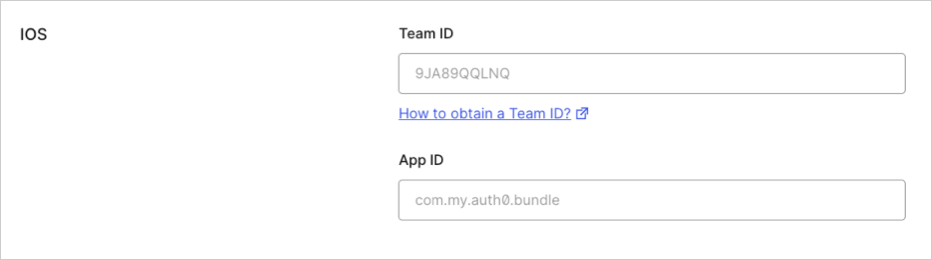
      Go to the [settings page](https://manage.auth0.com/dashboard/us/#/applications/) of your Auth0 application, scroll to the end, and open **Advanced
      Settings > Device Settings**. In the **iOS** section, set **Team ID** to your [Apple Team ID](https://developer.apple.com/help/account/manage-your-team/locate-your-team-id/) and **App ID** to your app's bundle identifier.

      <Frame>
        <img src="https://images.ctfassets.net/cdy7uua7fh8z/62v9bB3bUVMw9XLND5lcMI/d7b81872d8b442a36bcdc412384c14b7/IOS_Settings_-_English.png" />
      </Frame>

      This will add your app to your Auth0 tenant's `apple-app-site-association` file.

      #### Add the associated domain capability

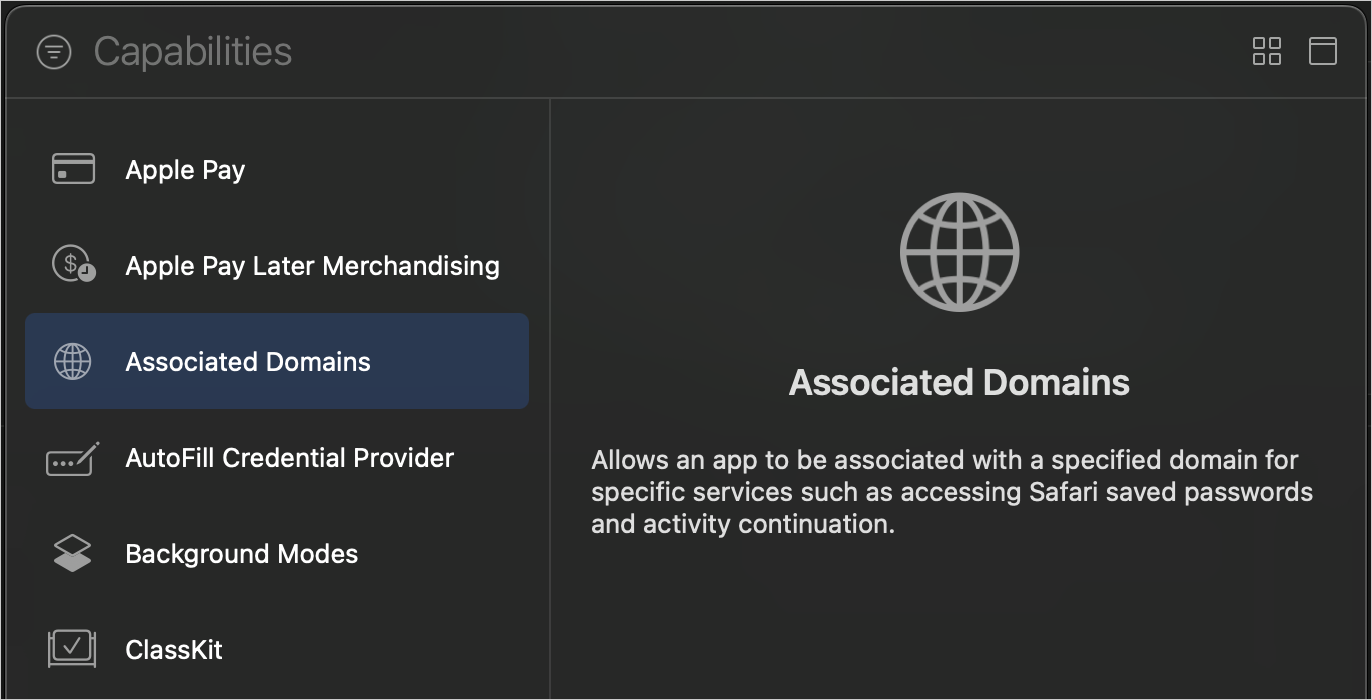
      In Xcode, go to the **Signing and Capabilities** [tab](https://developer.apple.com/documentation/xcode/adding-capabilities-to-your-app#Add-a-capability) of your app's target settings, and press the **+
      Capability** button. Then select **Associated Domains**.

      <Frame>
        <img src="https://images.ctfassets.net/cdy7uua7fh8z/72eVE104zKB5Q4NPnx6MCa/66c81ee64f104583bd00b9916778f989/ios-xcode-capabilities.png" />
      </Frame>

      Next, add the following [entry](https://developer.apple.com/documentation/xcode/configuring-an-associated-domain#Define-a-service-and-its-associated-domain) under **Associated Domains**:

      ```
      webcredentials:labs-fundtraining.us.auth0.com
      ```

      If you have a custom domain, use this instead of your
      Auth0 tenant’s domain.

      <Callout icon="file-lines" iconType="regular">
        For the associated domain to work, your app must be signed with your team certificate **even when
        building for the iOS simulator**. Make sure you are using the Apple Team whose Team ID is configured
        in the settings page of your Auth0 application.
      </Callout>
    </Section>

    <Section id={sections[1].id} title={sections[1].title} stepNumber="2">
      ### Using the Swift Package Manager

      Open the following menu item in Xcode:

      **File > Add Package Dependencies...**

      In the **Search or Enter Package URL** search box enter this URL:

      ```
      https://github.com/auth0/Auth0.swift
      ```

      Then, select the dependency rule and press **Add Package**.

      <Callout icon="file-lines" iconType="regular">
        For further reference on SPM, check its [official documentation](https://developer.apple.com/documentation/xcode/adding-package-dependencies-to-your-app).
      </Callout>

      ### Using Cocoapods

      Add the following line to your `Podfile`:

      ```
      pod 'Auth0', '~> 2.0'
      ```

      Then, run `pod install`.

      <Callout icon="file-lines" iconType="regular">
        For further reference on Cocoapods, check their [official documentation](https://guides.cocoapods.org/using/getting-started.html).
      </Callout>

      ### Using Carthage

      Add the following line to your `Cartfile`:

      ```
      github "auth0/Auth0.swift" ~> 2.0
      ```

      Then, run `carthage bootstrap --use-xcframeworks`.

      <Callout icon="file-lines" iconType="regular">
        For further reference on Carthage, check their [official documentation](https://github.com/Carthage/Carthage#getting-started).
      </Callout>
    </Section>

    <Section id={sections[2].id} title={sections[2].title} stepNumber="3">
      The Auth0.swift SDK needs your Auth0 **domain** and **Client ID**. You can find these values in the [settings
      page](https://manage.auth0.com/dashboard/us/#/applications/) of your Auth0 application.

      * **domain**: The domain of your Auth0 tenant. If you have a custom domain, use this instead of your Auth0 tenant’s
        domain.
      * **Client ID**: The alphanumeric, unique ID of the Auth0 application you set up earlier in this quickstart.

      Create a `plist` file named `Auth0.plist` in your app bundle containing the Auth0 domain
      and Client ID values.

      <Callout icon="file-lines" iconType="regular">
        You can also configure the SDK programmatically. Check the [README](https://github.com/auth0/Auth0.swift#configure-client-id-and-domain-programmatically) to learn more.
      </Callout>

      <Callout icon="file-lines" color="#0EA5E9" iconType="regular">
        ##### Checkpoint

        You configured the Auth0.swift SDK. Run your app to verify that it is not producing any errors related to
        the SDK.
      </Callout>
    </Section>

    <Section id={sections[3].id} title={sections[3].title} stepNumber="4">
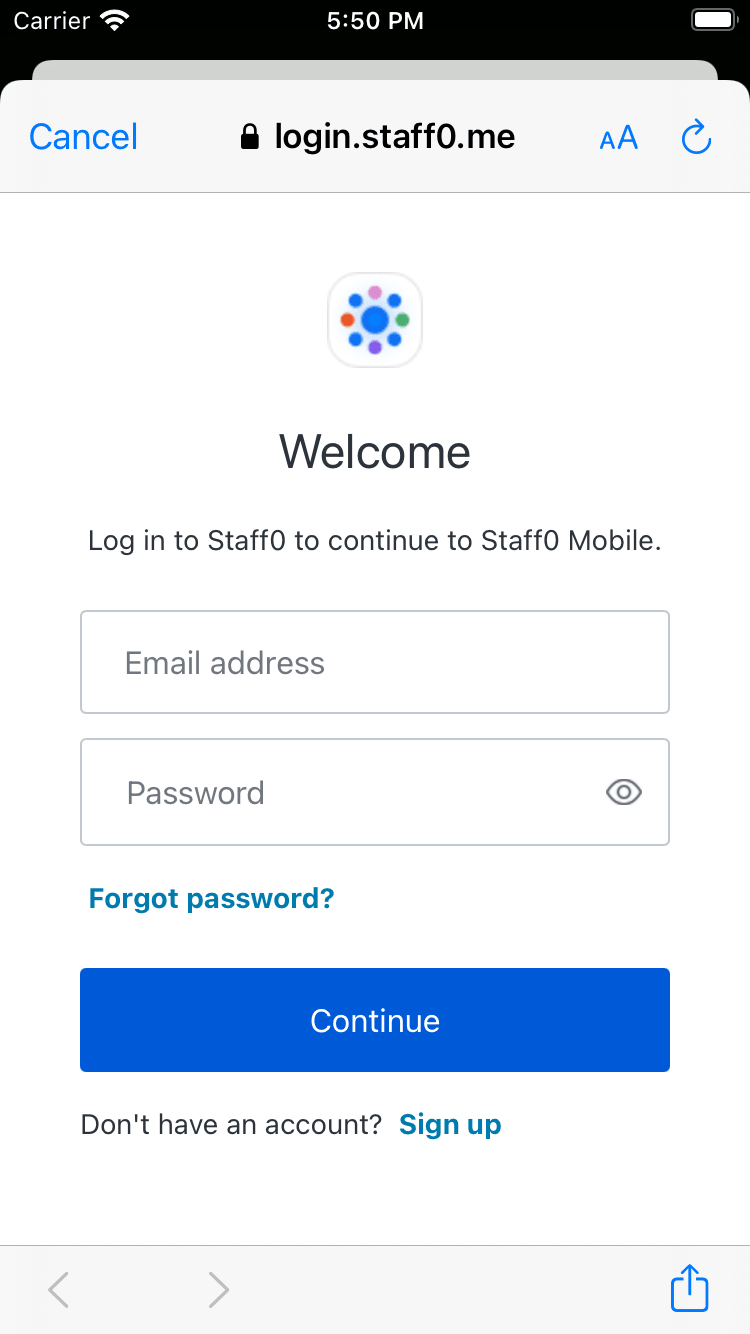
      Import the `Auth0` module in the file where you want to present the login page. Then, present the Universal Login page in the action of your **Login**
      button.

      <Callout icon="file-lines" iconType="regular">
        You can use async/await or Combine instead of the callback-based API. Check the [README](https://github.com/auth0/Auth0.swift#web-auth-login-ios--macos) to learn more.
      </Callout>

      <Frame>
        <img src="https://images.ctfassets.net/cdy7uua7fh8z/3ZRDXpjlUXEcQpXq6Q00L1/789d583affd1f09621dc59ae49b4060c/login-ios.png" />
      </Frame>

      <Callout icon="file-lines" color="#0EA5E9" iconType="regular">
        ##### Checkpoint

        Press the **Login** button and verify that:

        * An [alert box](https://github.com/auth0/Auth0.swift#sso-alert-box-ios--macos) shows up asking for consent.
        * Choosing \*\*Continue \*\*opens the Universal Login page in a Safari modal.
        * You can log in or sign up using a username and password or a social provider.
        * The Safari modal closes automatically afterward.
      </Callout>
    </Section>

    <Section id={sections[4].id} title={sections[4].title} stepNumber="5">
      Now that you can log in to your app, you need a way to [log out](https://auth0.com/docs/authenticate/login/logout). In the action of your **Logout** button, call the `clearSession()`
      method to clear the Universal Login session cookie.

      <Callout icon="file-lines" color="#0EA5E9" iconType="regular">
        ##### Checkpoint

        Press the **Logout** button and verify that:

        * An alert box shows up asking for consent.
        * Choosing \*\*Continue \*\*opens a page in a Safari modal.
        * The Safari modal closes automatically soon after.
      </Callout>
    </Section>

    <Section id={sections[5].id} title={sections[5].title} stepNumber="6">
      The `Credentials` instance you obtained after logging in includes an ID token. The ID token contains the profile information
      associated with the logged-in user, such as their email and profile picture. You can use these details to
      personalize the user interface of your app.

      The Auth0.swift SDK includes a [utility](https://github.com/auth0/JWTDecode.swift) for decoding [JWTs](https://jwt.io/) like the ID token. Start by importing the `JWTDecode` module in
      the file where you want to access the user profile information. Then, use the `decode(jwt:)` method to
      decode the ID token and access the claims it contains.

      <Callout icon="file-lines" iconType="regular">
        You can retrieve the latest user information with the `userInfo(withAccessToken:)` method.
        Check the [EXAMPLES](https://github.com/auth0/Auth0.swift/blob/master/EXAMPLES.md#retrieve-user-information) to learn more.
      </Callout>

      <Callout icon="file-lines" color="#0EA5E9" iconType="regular">
        ##### Checkpoint

        Verify that you can access the `email`, `picture`, or any other claim after you have logged in.
      </Callout>
    </Section>

    ## Next Steps

    Excellent work! If you made it this far, you should now have login, logout, and user profile information running in your application.

    This concludes our quickstart tutorial, but there is so much more to explore. To learn more about what you can do with Auth0, check out:

    * [Auth0 Dashboard](https://manage.auth0.com/dashboard/us/dev-gja8kxz4ndtex3rq) - Learn how to configure and manage your Auth0 tenant and applications
    * [Auth0.swift SDK](https://github.com/auth0/Auth0.swift) - Explore the SDK used in this tutorial more fully
    * [Auth0 Marketplace](https://marketplace.auth0.com/) - Discover integrations you can enable to extend Auth0’s functionality
  </Content>

  <SideMenu sections={sections}>
    <SideMenuSectionItem id={sections[0].id}>
      <SignUpForm />
    </SideMenuSectionItem>

    <SideMenuSectionItem id={sections[1].id}>
      <SignUpForm />
    </SideMenuSectionItem>

    <SideMenuSectionItem id={sections[2].id}>
      <CodeGroup>
        ```xml Auth0.plist lines  theme={null}
        <?xml version="1.0" encoding="UTF-8"?>
        <!DOCTYPE plist PUBLIC "-//Apple//DTD PLIST 1.0//EN" "http://www.apple.com/DTDs/PropertyList-1.0.dtd">
        <plist version="1.0">
        <dict>
            <key>ClientId</key>
            <string>mz9iNEIo2PHu7oeh8QRt19ndTyyCIgai</string>
            <key>Domain</key>
            <string>dev-gja8kxz4ndtex3rq.us.auth0.com</string>
        </dict>
        </plist>
        ```

        ```swift MainView.swift lines highlight={20-31} theme={null}
        import SwiftUI
        import Auth0

        struct MainView: View {
            @State var user: User?

            var body: some View {
                if let user = self.user {
                    VStack {
                        ProfileView(user: user)
                        Button("Logout", action: self.logout)
                    }
                } else {
                    Button("Login", action: self.login)
                }
            }
        }

        extension MainView {
            func login() {
                Auth0
                    .webAuth()
                    .useHTTPS() // Use a Universal Link callback URL on iOS 17.4+ / macOS 14.4+
                    .start { result in
                        switch result {
                        case .success(let credentials):
                            self.user = User(from: credentials.idToken)
                        case .failure(let error):
                            print("Failed with: \(error)")
                        }
                    }
            }

            func logout() {
                Auth0
                    .webAuth()
                    .useHTTPS() // Use a Universal Link logout URL on iOS 17.4+ / macOS 14.4+
                    .clearSession { result in
                        switch result {
                        case .success:
                            self.user = nil
                        case .failure(let error):
                            print("Failed with: \(error)")
                        }
                    }
            }
        }
        ```

        ```swift ProfileView.swift lines  theme={null}
        ```

        ```swift User.swift lines highlight={11-14} theme={null}
        import JWTDecode

        struct User {
            let id: String
            let email: String
            let picture: String
        }

        extension User {
            init?(from idToken: String) {
                guard let jwt = try? decode(jwt: idToken),
                      let id = jwt.subject,
                      let email = jwt["email"].string,
                      let picture = jwt["picture"].string
                else { return nil }
                self.id = id
                self.email = email
                self.picture = picture
            }
        }
        ```
      </CodeGroup>
    </SideMenuSectionItem>

    <SideMenuSectionItem id={sections[3].id}>
      <CodeGroup>
        ```swift MainView.swift lines highlight={20-31} theme={null}
        import SwiftUI
        import Auth0

        struct MainView: View {
            @State var user: User?

            var body: some View {
                if let user = self.user {
                    VStack {
                        ProfileView(user: user)
                        Button("Logout", action: self.logout)
                    }
                } else {
                    Button("Login", action: self.login)
                }
            }
        }

        extension MainView {
            func login() {
                Auth0
                    .webAuth()
                    .useHTTPS() // Use a Universal Link callback URL on iOS 17.4+ / macOS 14.4+
                    .start { result in
                        switch result {
                        case .success(let credentials):
                            self.user = User(from: credentials.idToken)
                        case .failure(let error):
                            print("Failed with: \(error)")
                        }
                    }
            }

            func logout() {
                Auth0
                    .webAuth()
                    .useHTTPS() // Use a Universal Link logout URL on iOS 17.4+ / macOS 14.4+
                    .clearSession { result in
                        switch result {
                        case .success:
                            self.user = nil
                        case .failure(let error):
                            print("Failed with: \(error)")
                        }
                    }
            }
        }
        ```

        ```xml Auth0.plist lines  theme={null}
        <?xml version="1.0" encoding="UTF-8"?>
        <!DOCTYPE plist PUBLIC "-//Apple//DTD PLIST 1.0//EN" "http://www.apple.com/DTDs/PropertyList-1.0.dtd">
        <plist version="1.0">
        <dict>
            <key>ClientId</key>
            <string>mz9iNEIo2PHu7oeh8QRt19ndTyyCIgai</string>
            <key>Domain</key>
            <string>dev-gja8kxz4ndtex3rq.us.auth0.com</string>
        </dict>
        </plist>
        ```

        ```swift ProfileView.swift lines  theme={null}
        ```

        ```swift User.swift lines highlight={11-14} theme={null}
        import JWTDecode

        struct User {
            let id: String
            let email: String
            let picture: String
        }

        extension User {
            init?(from idToken: String) {
                guard let jwt = try? decode(jwt: idToken),
                      let id = jwt.subject,
                      let email = jwt["email"].string,
                      let picture = jwt["picture"].string
                else { return nil }
                self.id = id
                self.email = email
                self.picture = picture
            }
        }
        ```
      </CodeGroup>
    </SideMenuSectionItem>

    <SideMenuSectionItem id={sections[4].id}>
      <CodeGroup>
        ```swift MainView.swift lines highlight={34-45} theme={null}
        import SwiftUI
        import Auth0

        struct MainView: View {
            @State var user: User?

            var body: some View {
                if let user = self.user {
                    VStack {
                        ProfileView(user: user)
                        Button("Logout", action: self.logout)
                    }
                } else {
                    Button("Login", action: self.login)
                }
            }
        }

        extension MainView {
            func login() {
                Auth0
                    .webAuth()
                    .useHTTPS() // Use a Universal Link callback URL on iOS 17.4+ / macOS 14.4+
                    .start { result in
                        switch result {
                        case .success(let credentials):
                            self.user = User(from: credentials.idToken)
                        case .failure(let error):
                            print("Failed with: \(error)")
                        }
                    }
            }

            func logout() {
                Auth0
                    .webAuth()
                    .useHTTPS() // Use a Universal Link logout URL on iOS 17.4+ / macOS 14.4+
                    .clearSession { result in
                        switch result {
                        case .success:
                            self.user = nil
                        case .failure(let error):
                            print("Failed with: \(error)")
                        }
                    }
            }
        }
        ```

        ```xml Auth0.plist lines  theme={null}
        <?xml version="1.0" encoding="UTF-8"?>
        <!DOCTYPE plist PUBLIC "-//Apple//DTD PLIST 1.0//EN" "http://www.apple.com/DTDs/PropertyList-1.0.dtd">
        <plist version="1.0">
        <dict>
            <key>ClientId</key>
            <string>mz9iNEIo2PHu7oeh8QRt19ndTyyCIgai</string>
            <key>Domain</key>
            <string>dev-gja8kxz4ndtex3rq.us.auth0.com</string>
        </dict>
        </plist>
        ```

        ```swift ProfileView.swift lines  theme={null}
        ```

        ```swift User.swift lines highlight={11-14} theme={null}
        import JWTDecode

        struct User {
            let id: String
            let email: String
            let picture: String
        }

        extension User {
            init?(from idToken: String) {
                guard let jwt = try? decode(jwt: idToken),
                      let id = jwt.subject,
                      let email = jwt["email"].string,
                      let picture = jwt["picture"].string
                else { return nil }
                self.id = id
                self.email = email
                self.picture = picture
            }
        }
        ```
      </CodeGroup>
    </SideMenuSectionItem>

    <SideMenuSectionItem id={sections[5].id}>
      <CodeGroup>
        ```swift User.swift lines highlight={11-14} theme={null}
        import JWTDecode

        struct User {
            let id: String
            let email: String
            let picture: String
        }

        extension User {
            init?(from idToken: String) {
                guard let jwt = try? decode(jwt: idToken),
                      let id = jwt.subject,
                      let email = jwt["email"].string,
                      let picture = jwt["picture"].string
                else { return nil }
                self.id = id
                self.email = email
                self.picture = picture
            }
        }
        ```

        ```xml Auth0.plist lines  theme={null}
        <?xml version="1.0" encoding="UTF-8"?>
        <!DOCTYPE plist PUBLIC "-//Apple//DTD PLIST 1.0//EN" "http://www.apple.com/DTDs/PropertyList-1.0.dtd">
        <plist version="1.0">
        <dict>
            <key>ClientId</key>
            <string>mz9iNEIo2PHu7oeh8QRt19ndTyyCIgai</string>
            <key>Domain</key>
            <string>dev-gja8kxz4ndtex3rq.us.auth0.com</string>
        </dict>
        </plist>
        ```

        ```swift MainView.swift lines highlight={20-31} theme={null}
        import SwiftUI
        import Auth0

        struct MainView: View {
            @State var user: User?

            var body: some View {
                if let user = self.user {
                    VStack {
                        ProfileView(user: user)
                        Button("Logout", action: self.logout)
                    }
                } else {
                    Button("Login", action: self.login)
                }
            }
        }

        extension MainView {
            func login() {
                Auth0
                    .webAuth()
                    .useHTTPS() // Use a Universal Link callback URL on iOS 17.4+ / macOS 14.4+
                    .start { result in
                        switch result {
                        case .success(let credentials):
                            self.user = User(from: credentials.idToken)
                        case .failure(let error):
                            print("Failed with: \(error)")
                        }
                    }
            }

            func logout() {
                Auth0
                    .webAuth()
                    .useHTTPS() // Use a Universal Link logout URL on iOS 17.4+ / macOS 14.4+
                    .clearSession { result in
                        switch result {
                        case .success:
                            self.user = nil
                        case .failure(let error):
                            print("Failed with: \(error)")
                        }
                    }
            }
        }
        ```

        ```swift ProfileView.swift lines  theme={null}
        ```
      </CodeGroup>
    </SideMenuSectionItem>
  </SideMenu>
</Recipe>